MotherDuck CEO says single-node analytics can outperform distributed systems

Jordan Tigani, MotherDuck CEO, argues that many analytics teams are paying a complexity tax for workloads that never needed it.
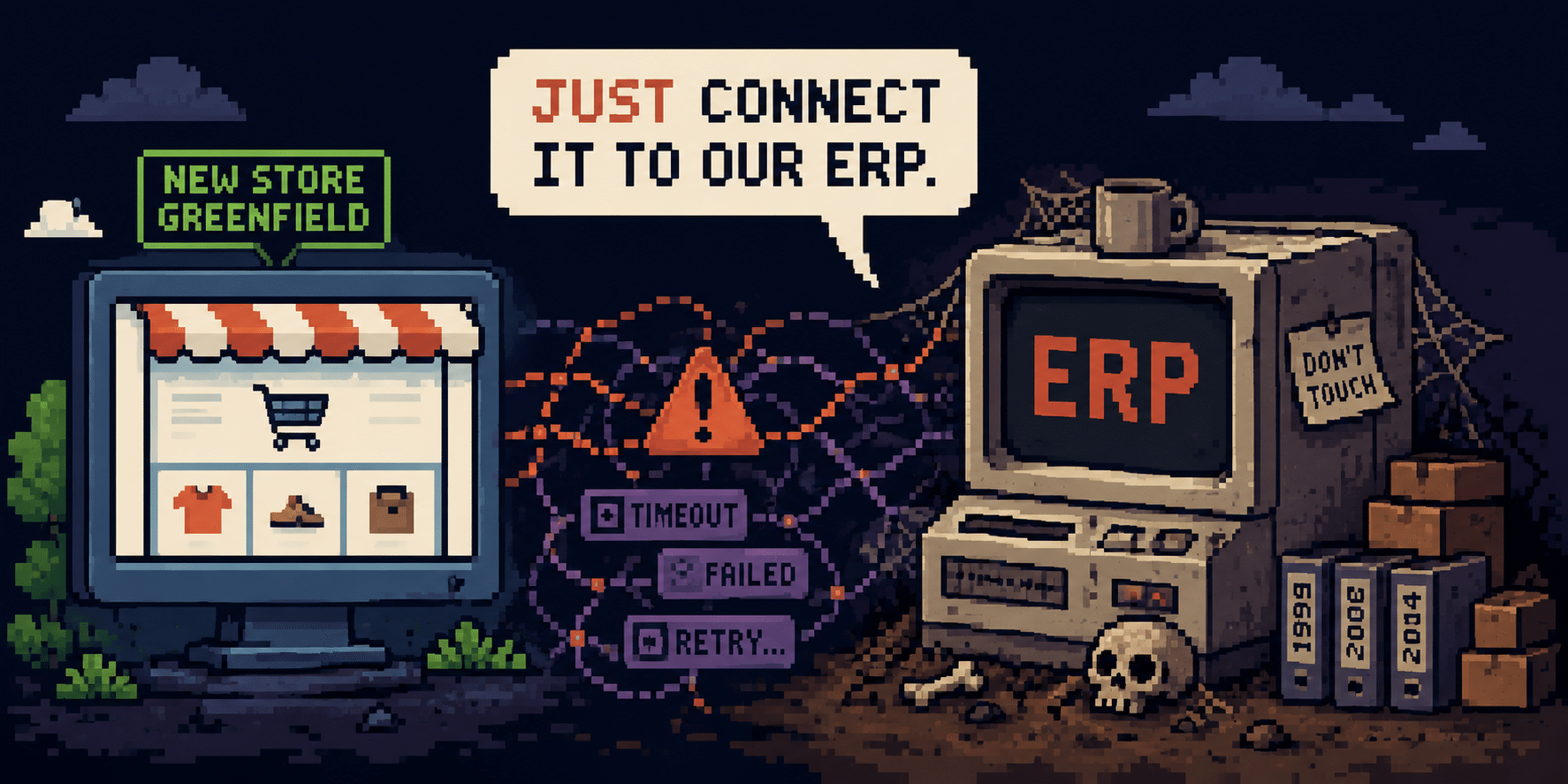
Four words show up in almost every eCommerce project we take on here at Neuralab: “Just connect it to our ERP.“ They usually drop near the end of a kickoff call, tossed out as casually as asking for the Wi-Fi password.
The word doing all the heavy lifting (and all the damage) there is just. It’s the word that turns a monolithic beast of a legacy system that nobody in the room fully understands into a neat little line item some project manager expects to close in a two-week sprint.
I want to make an argument that sounds painfully obvious once you say it out loud, yet gets completely ignored on most projects: building a new store and connecting it to the systems already running the business are not the same sport. Heck, they’re barely the same project!
A new storefront is greenfield. Clear ground with no legacy baggage. You plan the architecture and data model upfront and mostly hold to the plan. An integration with an existing ERP or CRM is brownfield by default. It’s an archaeological dig into an old system you didn’t build, that’s poorly structured, still running, and troublesome in ways nobody ever bothered to write down. Treat the second like the first and you get an integration that works beautifully in the demo and completely shits the bed the first time a real order does something unexpected.
There is a fix, and it comes down to timing more than technique. I’ll get to it, but first you need to see what you’re actually up against.
Let’s start with what the integration layer actually is. The storefront takes the order – the gateway authorizes the cash – the tax engine figures out the state’s cut – the ERP opens a sales order and reserves stock – accounting generates an invoice – the warehouse picks and packs – the CRM logs it all so customer support has something to stare at next week.
Every single one of those systems has an owner. But the handoff between them has no real owner at all. That’s what the integration layer is: the unowned seams. And seams are exactly where the fabric tears, because it’s the one place where two systems that were designed in total isolation have to agree on something in real-time, having never formally met.
Payment authorization must happen synchronously, meaning the customer needs an immediate response while they are waiting on the checkout screen. The payment gateway typically has up to a minute to confirm whether the transaction is approved or declined. But everything after the payment – opening the ERP order, reserving stock, pinging the warehouse – has to be asynchronous. You simply can’t make a paying customer wait on an ancient ERP API that answers whenever it feels like it. You are accepting eventual consistency by default here, simply because holding synchronous cross-system locks will butcher your conversion rates.
So, the confirmation page fires the instant the payment clears, telling the customer “you’re all set” a beat before the system actually knows if it can deliver on that promise. Without explicit architectural patterns to handle that gap you’re just playing infrastructure roulette.
Most of the time, this gap closes in milliseconds and nobody’s the wiser. But sometimes it doesn’t. The payment clears, but the queued job to create the order times out or drops on the floor without a sound. Now you’ve taken their money with no order behind it.
That failure rarely hits the dev team first. Instead, an account manager has to act as human middleware – cross-referencing payment logs, re-typing order data into the ERP, and calling the warehouse floor to check on a shipment. Forcing humans to manually heal a cracking system is the most expensive bottleneck of a poorly planned integration.
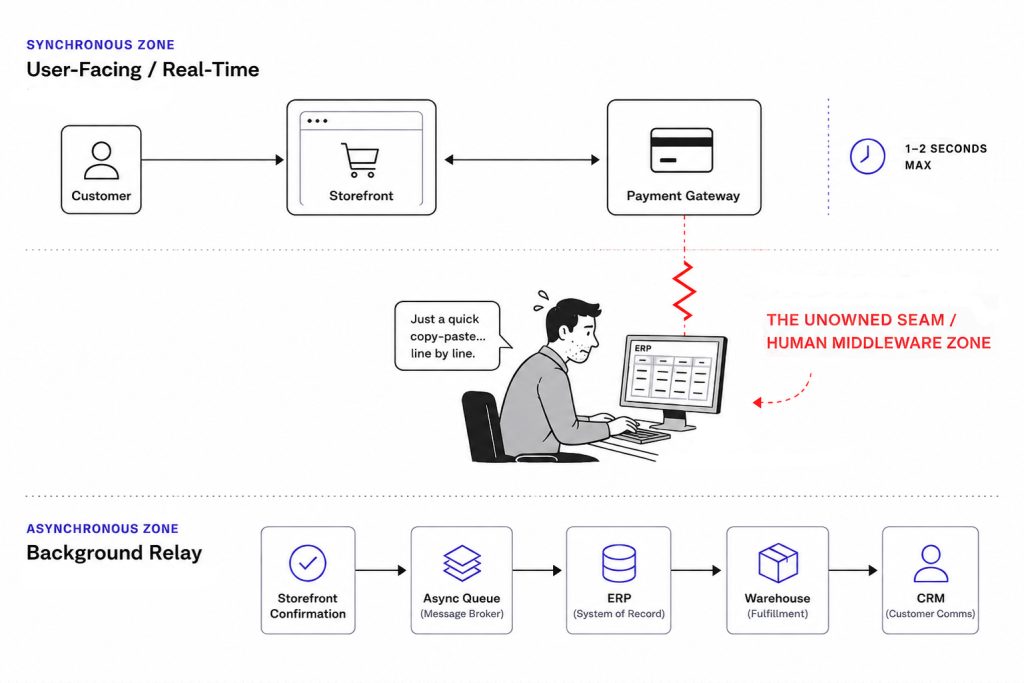
The fixes here aren’t exotic but they do need to be explicitly planned, and budgeted upfront, a line item almost nobody includes until after their first major post-launch fire drill.
Any ERP or CRM that’s been running a real business for a few years has grown a thick layer of weird behavior that exists nowhere in its documentation. By that I mean a product-code field that silently clips at forty characters, so anything longer has been quietly losing its last digits since 2019. Or a nightly cron job that only works because some guy manually restarts it every Tuesday. Or an “order status” column that encodes five completely different business meanings depending on which department touched it last.
An outside team scoping a connection to that system on day one is just looking at a facade. They can read the API docs and see the tables, but they cannot see which of those unmapped load-bearing walls their integration is about to lean on. So the scope gets written against the version of the system that exists on paper, not the one coughing in production.
There’s a concept worth borrowing here: The Lindy effect. The longer something has already survived, the longer it’s likely to keep going. That 15-year-old ERP is still there precisely because too much depends on it for anyone to risk ripping it out. Its longevity is proof of its necessity.
When you arrive with a shiny new tech stack, the temptation is to treat the old system as dead weight and a dumb obstacle overdue for replacement. Resist that instinct! The old system has survived contact with the actual business for a decade and a half. It knows things your new build doesn’t know yet, encoded in all those annoying quirks you keep tripping over. Treat it as a battle-tested opponent rather than a nuisance and try to untangle its accumulated weirdness.
Put the greenfield and brownfield halves together and the most common planning error becomes glaringly obvious. Clients, and plenty of agencies, scope the new build and the integration as one single piece of work. Same estimate, same timeline, same assumption that they’re the same species of task.
They are not, and if you bundle them together you actively poison the integration.
When you write that combined scope, the new platform’s data model doesn’t even exist yet. Its catalog structure, content architecture, and the actual shape of the data are completely unsettled. So you’re designing an integration against a guess, layered on top of the fog already surrounding the old ERP. Guess wrong on either end, and you’re in for massive rework right when the deadline is breathing down your neck – which is exactly when developers start reaching for shortcuts that become those fragile seams everyone has to live with afterward.
The fix is a sequencing decision, and it’s almost boringly simple:
Build the new thing first. While that’s happening, send an analyst into the existing systems to do a pure audit. Figure out what the system actually does and where the unmapped walls are. Once the new platform is close to finished and its data model is a fact rather than a weekly weather forecast, then you scope the integration. Now both ends are known.
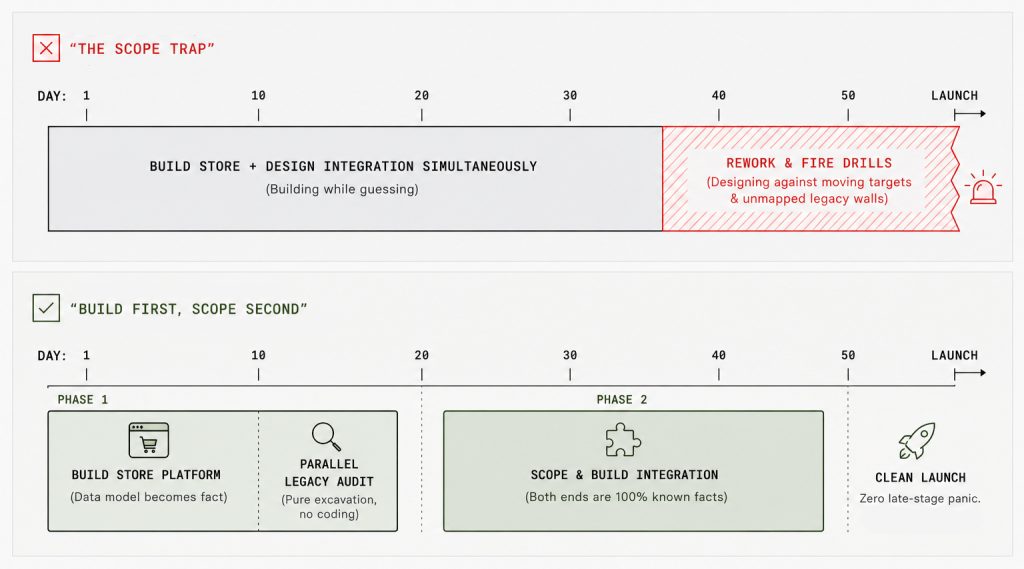
I’ll be honest, we learned this the expensive way at Neuralab. Years ago, we used to bundle the two into one scope to give a client a tidier number upfront. We’d then spend all that “saved” time back with massive interest during the last three weeks of the project, desperately discovering what the old system actually does.
Even if sequenced right, integrations are the hardest work we estimate in Neuralab because there’s a quiet trap that inflates the scope from the inside.
A client has an existing, complicated internal process. The natural instinct for both the developer and the business analyst is to lock onto that process and faithfully rebuild it in the new system, because a concrete process sitting in front of you is a satisfying puzzle to solve.
The question almost nobody asks is whether that process still needs to exist at all. Was half of it just scaffolding for a limitation the new system doesn’t even have? Faithfully cloning a bad process that shouldn’t survive the migration just relocates the waste into a more expensive place and bills you for the move.
We saw this clearly with one of our large pharmacy clients. Their original plan was to manage and edit all rich product details such as marketing copy, attributes, or extended specifications inside their legacy ERP, and then force all that content downstream to the web store. But standard ERPs are notoriously bad at managing complex eCommerce datasets and rich visual content.
Instead of building a fragile, over-engineered integration to force an old ERP into doing a PIM’s job, we redrew the architectural boundaries. The ERP stayed strictly in its lane: holding SKUs, core titles, pricing, and stock quantities. Meanwhile, WooCommerce became the single source of truth for rich product content. It was essentially functioning as a lightweight PIM for all media and marketing data.
By questioning the legacy workflow instead of blindly automating it, we saved months of painful integration work and gave their team an architecture that actually fits how they work today.
So how do you actually wire this stuff together? Point-to-point custom code between each pair of systems is the wrong default. It works great right up until the day an order gets stuck, a client asks what happened, and your honest answer is that the event passed between two systems and vanished into the ether.
What actually holds up is an explicit orchestration layer sitting in the middle – whether that’s an event pipeline like n8n which we heavily use, a separately hosted application with its own logging and event-handling capabilities, or a messaging platform such as Kafka, Amazon SQS, or RabbitMQ. Its job is to own the sequencing, handle retries, and log every single event as it passes, so the whole flow can be inspected on its own.
When something breaks, you shouldn’t need write access to the ERP and an open database console on the storefront just to reconstruct the story. You should have one central place that already holds the receipts. Intentional middleware is the architecture our team defaults to now (usually reaching for custom applications or n8n to drive it). But the tool is just execution! The principle is the real point: the seams between systems deserve their own memory, because nobody else is taking notes.
The client isn’t wrong to want a “just.” A boring, invisible connection nobody ever thinks about is exactly what a good integration looks like from the outside. That simplicity is the finish line – you only reach it after someone goes down into the old system, maps the weak walls, and quietly absorbs the complexity so the business doesn’t have to.
So don’t argue with the person who says it, take it as the brief. Do enough excavation upfront so that a year from now, connecting to that ERP genuinely is simple, and the manual re-keying, the spreadsheets, and the cron job someone babysits every Tuesday become an old war story instead of your next Monday.