At NVIDIA, “Senior Software Engineer” can mean three different levels

NVIDIA’s career ladder isn’t linear, and it’s pretty hard to make sense of from the outside. I did some digging and asked around, so you don’t have to.
The Deployment Pipeline is a critical tool for ensuring software quality – and quality is a prerequisite for speed.
So, what is a Deployment Pipeline? How has it helped us improve both quality and speed? And what are, in my experience, the common problems in using and implementing deployment pipelines?
A Deployment Pipeline is a machine that helps us move from an idea to valuable software in the hands of users by organizing software development work. It enables us to go from commit to releasable outcome as quickly and efficiently as possible, in a repeatable and reliable way.
— Dave Farley, Continuous Delivery Pipelines: How to Build Better Software Faster
Before exploring how Deployment Pipelines have helped us, it is helpful to briefly introduce Continuous Integration and Continuous Delivery.
Continuous Integration is a software development practice that helps us create and maintain a high-quality codebase that is easy to change and to implement new features.
As Martin Fowler points out, the practices of Continuous Integration are:
Kent Beck developed the practice of Continuous Integration as part of Extreme Programming in the 1990s. The book Continuous Integration by Paul M. Duvall, Steve Matyas, and Andrew Glover was published in 2007. While this is nothing new, many software engineers and teams still do not practice Continuous Integration and therefore miss out on the benefits it provides.
Continuous Delivery can further help create and maintain high-quality software. The excellent book Continuous Delivery by Jez Humble and David Farley was published in 2010. and it describes the idea behind continuous delivery in detail, and it introduces “…the central paradigm of the book – a pattern we call the deployment pipeline“.
Continuous Delivery is the ability to get changes of all types – including new features, configuration changes, bug fixes and experiments – into production, or into the hands of users, safely and quickly in a sustainable way.
Continuous Integration is a prerequisite for Continuous Delivery.
The minimum activities required for Continuous Delivery, as defined by minimumcd.org, are:
The best description of deployment pipelines, and practical advice on how to implement them, I found in another excellent book Continuous Delivery Pipelines, How to Build Better Software Faster by Dave Farley. According to him, automation is the key… and is the engine that drives an effective Deployment Pipeline:
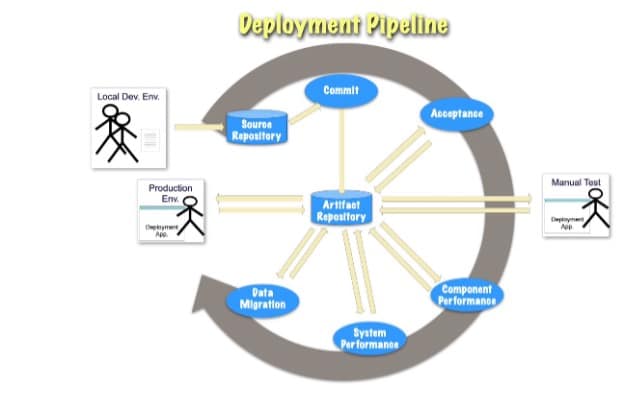
The simplest deployment pipeline should, after each commit, compile the code (if needed), run all unit tests, create a deployable artifact, execute acceptance tests, and enable deployment to production.
However, a deployment pipeline can do much more, such as:
I see many teams/companies have a Jenkins job that compiles source code, runs (a few) unit tests, creates an artifact – often a Docker image – and have a separate deploy job/button to deploy to the dev and production environments. And they will say they are “using” CI/CD. But most of them are skipping some of the CI practices and don’t have code in an always-deployable state, even as a goal, yet still think they are “using” CI/CD.
CI practices are not a menu where you can choose what you like and still have all the benefits CI can help you with.
Test-Driven Development (TDD), or test-first development, is still an exception, and developers usually write tests after the code. Those tests are mostly unit tests (developer-oriented) and much fewer acceptance tests (user-oriented) that cover only parts of the functionalities. The test-after approach usually covers less functionality because the code is harder to test, and tests are complex to write and maintain. Such tests don’t provide fast and good-enough feedback to automate “releasability of changes” or “enable refactoring for sustained productivity.” Developers don’t trust such tests, so manual verification and team coordination are needed to decide when code can be deployed, which is never fully reliable, and more bugs reach production.
Same as TDD, trunk-based development is still an exception, and almost everyone is using branches and pull requests with many PR reviews at the end of the sprint, so they are not practicing continuous integration by definition. They are missing the benefits CI brings, like “less time wasted in integration” and “enables refactoring for sustained productivity.”
Some companies have a “static” copy of production, with test data already prepared in a database, where they deploy their applications and run tests. As a result, developers can’t run tests on their laptops, test preparation is complex and slow, and they regularly break other tests. Feature flags can’t be tested, and it takes a long time from commit to getting test feedback. This demotivates developers from writing tests, and over time, this negative spiral creates ‘legacy’ code that is hard to change.
Rarely does any company I know create, on demand, a “clone of production” – with the configuration needed for a suite of tests set up exactly as in production, where the tested application is deployed the same way as in production and then tested to determine the releasability of changes.
Usually, a Jenkins job starts the needed testcontainers during the integration test phase and tests parts of the application – or a “test” version of the application – that differ from the production application. These tests don’t cover the application artifact that will actually be deployed, nor do they test deployment, configuration, or dependencies (e.g., microservices) that aren’t properly mocked. Instead, some fake repository or adapter implementations are used that don’t exist in production.
From what I’ve seen or heard, everyone has a workaround that allows deployment of artifacts that didn’t pass the Deployment Pipeline. Sometimes they create artifacts on their laptop and push them to the repository so they can be deployed. Other times, the pipeline itself allows deployment of code that hasn’t passed all required verifications.
This can happen when a “non-important” or “flaky” test fails, or when a dependency has a critical vulnerability, etc. Usually, the team says these problems will be fixed later, when there’s time, but the new feature is considered urgent and must be deployed ASAP. In practice, the team never has time to fix these issues, workarounds become the norm, and the deployment pipeline turns into a theater.
With microservices being so popular, build time shouldn’t be a major problem. Yet it’s common to see builds lasting half an hour or more.
In my experience (mostly with Java), if you create tests – unit tests, acceptance tests, etc. – that can run in parallel, it’s easy to have a deployment pipeline finish in under 5 minutes, excluding deployment. Just run everything in parallel: unit tests, acceptance tests, services with different feature flags enabled or disabled, and static code analysis.
A deployment pipeline automates your software development process and reveals both its strengths and weaknesses. When your practices are strong, the pipeline amplifies them, providing significant benefits. Conversely, if your practices are weak, the pipeline makes this very apparent – it can be difficult or even impossible to implement effectively.
This is why Continuous Integration and Continuous Delivery are so valuable: they encourage good practices and make problems visible early. A Deployment Pipeline is not a product you can buy or outsource; you must build it yourself, leveraging various tools.
In my experience, the best way to achieve both speed and quality in software development is to combine pair or mob programming with test-driven, trunk-based development, supported by a deployment pipeline that automates feedback on key aspects of the process. This approach provides rapid feedback, within minutes, on ideas and experiments through frequent commits and accompanying tests. It allows the codebase to evolve continuously through refactoring and enables the frequent, low-risk release of new features with minimal stress.